
In recent years, WhatsApp is our first choice for chatting with friends and family. And same for the business world, it is one of the most powerful channels for business among SMS and Emails. WhatsApp has billions of active users who open and check their messages multiple times a day making it a highly engaging platform for communication.
The competition in digital marketing increased. Businesses are shifting toward WhatsApp marketing to connect with customers instantly and personally.
Bulk WhatsApp messages deliver significantly higher open and read rates compared to traditional SMS and Email campaigns. SMS lacks rich media and interactivity and Emails often go unread in crowded inboxes. On other hands WhatsApp allows businesses to send personalized messages with media and clickable CTA buttons.
In this blog, we will discuss WhatsApp broadcast and How to send Bulk WhatsApp Campaigns using Authkey Platform.
What is WhatsApp Broadcast?
You may have received promotional messages from brands directly in your WhatsApp inbox. These are known as WhatsApp marketing messages or bulk WhatsApp broadcast campaigns.
A WhatsApp broadcast allows businesses to send a single message to multiple opted-in customers at once. Each recipient receives the message individually in their private chat, ensuring a personal and direct communication experience.
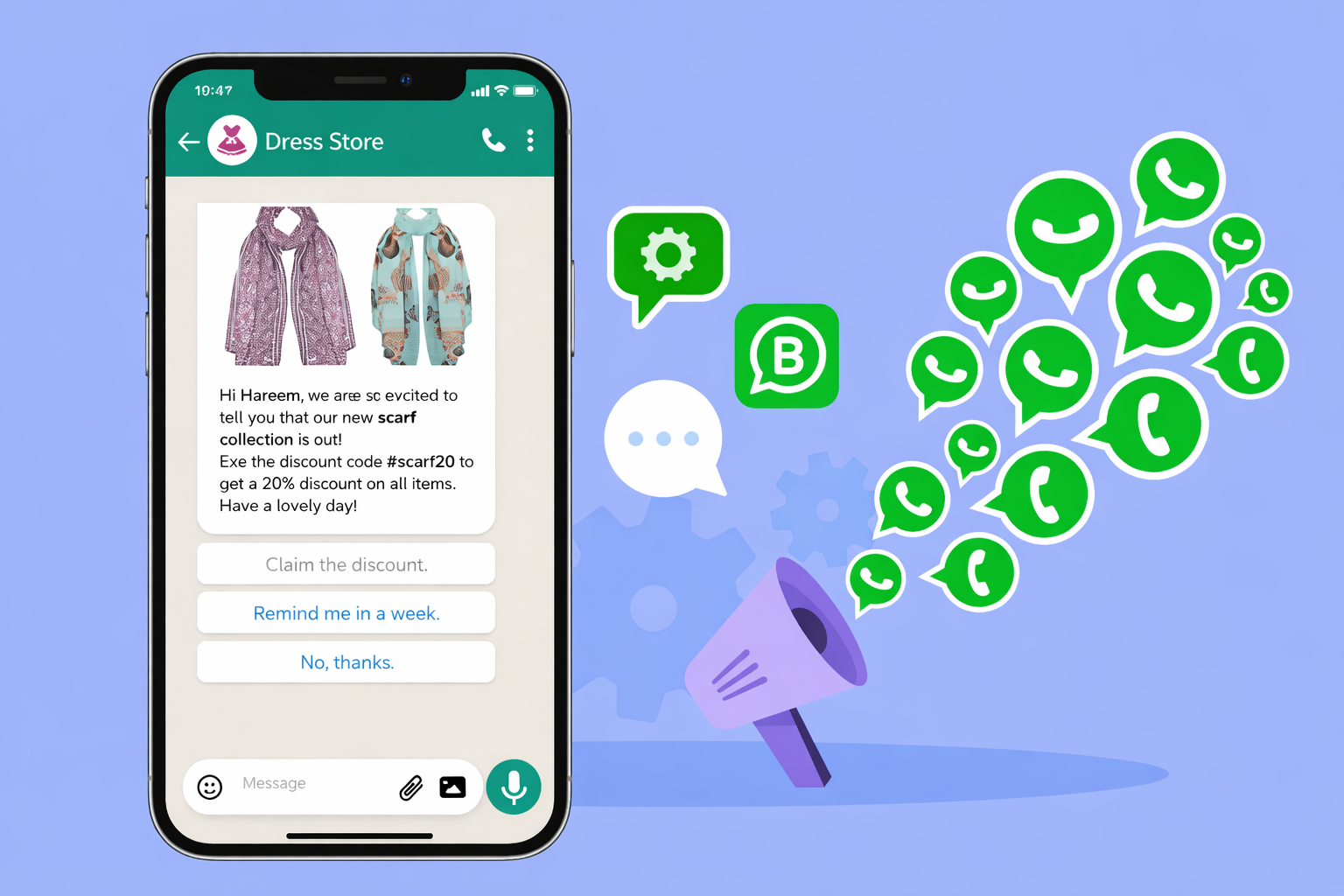
With Authkey’s WhatsApp marketing platform, businesses can send bulk WhatsApp broadcast campaigns securely using the official WhatsApp API or campaign software.
Authkey helps you send promotional, transactional and automated broadcast messages at scale while still maintaining a personalized one-to-one conversation with every customer.
Importance of Using the Official WhatsApp Business API
The official WhatsApp Business API is essential for sending bulk WhatsApp messages for marketing. WhatsApp (Meta) strictly regulates how promotional and bulk messaging is conducted on its platform to protect users from spam. If businesses send large volume messaging through unofficial tools or modified software, the risk of permanent number bans and loss of customer trust.
Authkey’s Official WhatsApp Business API always operates within the Meta’s compliance. It provides a verified business profile, which increases credibility and builds customer confidence. Before sending promotional campaigns through Authkey dashboard, message templates must be reviewed and approved by Meta. This approval process maintains content quality and prevents spam-like communication.
Another major advantage of using the official API is delivery reliability. Messages sent through Authkey platforms are routed through Meta. Additionally, messaging limits automatically increase as your account maintains good quality ratings and customer engagement, allowing businesses to grow their broadcast capacity over time.
Authkey operates entirely on the official WhatsApp API, providing businesses with a secure, compliant, and scalable environment to run bulk broadcast campaigns.
Read more: WhatsApp Cloud API vs Business API. Which Is Right for Your Business?
Can You Really Send Bulk WhatsApp Messages to Unlimited Users?
Many businesses ask whether they can send unlimited bulk WhatsApp messages in a single day. The answer depends on how WhatsApp messaging tiers work.
WhatsApp Messaging Tiers Explained
When you start using the official WhatsApp Business API, your WhatsApp number is placed in a messaging tier.
New WhatsApp Business accounts usually begin with a lower daily messaging limit (for example, 250 conversations per day). This is a standard process set by Meta to maintain platform quality.
As your business sends complimentary and high-quality campaigns, WhatsApp gradually increases your messaging capacity.
How to Increase Limit with Quality Campaigns?
WhatsApp messaging limits are not random or fixed permanently. They are performance-based and depend on how responsibly a business uses the platform.
When you start using the official WhatsApp Business Account, your number is assigned a messaging tier. This tier determines how many users you can message within a 24-hour period.
Your sending capacity increases gradually based on account quality and engagement signals. WhatsApp evaluates several important factors before upgrading your tier. These include whether you are messaging only opted-in customers, maintaining low block and spam report rates, achieving strong engagement such as reads and replies, using approved message templates, and consistently following Meta’s compliance policies.
When businesses send relevant, value-driven broadcast campaigns through Authkey’s platform, their account quality improves. As engagement remains positive and complaints stay low, WhatsApp automatically increases the messaging tier.
Over time, this enables businesses to scale from hundreds to thousands and eventually lakhs of users per day.
Higher limits are earned through responsible marketing and customer-focused communication, not through shortcuts.
Myth vs Reality of “Unlimited” Sending
When businesses hear the term “unlimited WhatsApp messages,” it often creates confusion. Let’s break down the myth and the reality clearly.
Myth
You can send unlimited WhatsApp messages from day one without any restrictions.
Reality
There is no fixed cap imposed by Authkey as a platform. However, your daily sending capacity is determined by your WhatsApp messaging tier, which is assigned by Meta under the official WhatsApp Business API framework.
New WhatsApp Business accounts typically start with a lower messaging limit. As you send compliant campaigns to opted-in users and maintain a strong quality rating (low spam reports, good engagement), your messaging tier automatically increases.
With perfect marketing strategies, this allows you to reach thousands and eventually lakhs of customers per day.
In simple terms, “unlimited” does not mean sending infinite messages instantly. It means your business can scale broadcast campaigns continuously and safely by following proper usage guidelines and maintaining high engagement standards.
Read more: How Do You Send a Transactional Message on WhatsApp?
Why Use WhatsApp Broadcast for Marketing?
WhatsApp Broadcast has become one of the most powerful marketing tools for businesses because it combines reach, personalization, and engagement in a single channel. Unlike traditional marketing platforms, WhatsApp allows brands to communicate directly with customers in a space they actively check multiple times a day.
High Open and Read Rates
WhatsApp messages typically achieve significantly higher open and read rates compared to email and SMS campaigns. Emails often get lost in crowded inboxes, while SMS lacks interactivity. WhatsApp messages appear as chat notifications, which increases the likelihood of immediate attention and faster response.
Direct Delivery to Personal Chat Inbox
Broadcast messages are delivered directly to the customer’s personal WhatsApp inbox. Each recipient receives the message individually, creating a one-to-one communication experience even when sent in bulk. This private delivery improves trust and increases engagement.
Read More: All-in-One WhatsApp CRM by Authkey: Automate, Manage, Convert
Rich Media, Buttons, and CTAs
With the official WhatsApp Business API, businesses can send more than just plain text. You can include images, videos, PDFs, product catalogs, and interactive call-to-action buttons. These features make campaigns more engaging and help drive clicks, conversions, and customer actions.
Two-Way Engagement
Unlike traditional broadcast channels, WhatsApp allows customers to reply instantly. This enables real-time conversations, quick query resolution, and stronger customer relationships. Businesses can turn a simple promotional message into a meaningful interaction that drives sales and loyalty.
WhatsApp Broadcast combines visibility, personalization and interactivity. This makes it a highly effective marketing channel for modern businesses.
Requirements Before Sending Broadcast Messages
Before launching a bulk WhatsApp broadcast campaign, businesses must meet certain mandatory requirements. These steps ensure compliance with WhatsApp policies and help maintain high delivery quality.
WhatsApp Business API Approval
To send bulk promotional messages at scale, you must use the official WhatsApp Business API. This requires setting up and verifying your business profile. The verification process confirms that your business is legitimate and authorized to communicate with customers on WhatsApp.
Using unofficial tools or personal WhatsApp numbers for bulk messaging can lead to account restrictions or permanent bans. API approval ensures secure and compliant campaign execution.
Customer Opt-Ins
WhatsApp strictly requires businesses to obtain customer consent before sending promotional messages. This means users must explicitly agree to receive communication from your business.
Opt-ins can be collected through:
- Website forms
- Checkout pages
- Lead generation campaigns
- SMS or email confirmation
Sending messages without proper opt-in can result in high block rates and damage your messaging tier.
Message Template Approval
Promotional and outbound messages must be created as templates and submitted for Meta approval. This ensures that the content follows WhatsApp’s communication guidelines and prevents spam-like messaging.
Once approved, these templates can be used for broadcast campaigns, reminders, offers, and other marketing communications.
Meeting these three requirements ensures your WhatsApp broadcast campaigns are compliant, scalable, and safe from number bans.
Read more: WhatsApp Chat Button: How to Add a Chat Button to Your Website?
Step-by-Step: How to Send a WhatsApp Broadcast Campaign with Authkey?
Launching a WhatsApp broadcast campaign through Authkey is simple, fast, and fully compliant with Meta’s policies. Here’s how the process works:
Get Official API Access
Authkey enables businesses to operate on the official WhatsApp Business API.
You can onboard your official WhatsApp Business Account (WABA) directly through the Authkey dashboard. The setup process is streamlined and typically takes around 10 minutes to complete. Once verified, your business is ready to send compliant bulk WhatsApp campaigns at scale.
Read more: WhatsApp Business API Onboarding– Embedded Signup: Go Live in just 10 minutes!
Upload Opted-In Contact List
To send a WhatsApp broadcast campaign, businesses must have a list of customers who have provided proper opt-in consent.
Authkey allows you to:
- Create and manage contact lists inside the dashboard
- Copy-paste mobile numbers directly
- Upload contacts using a CSV file
- Segment audiences for targeted campaigns
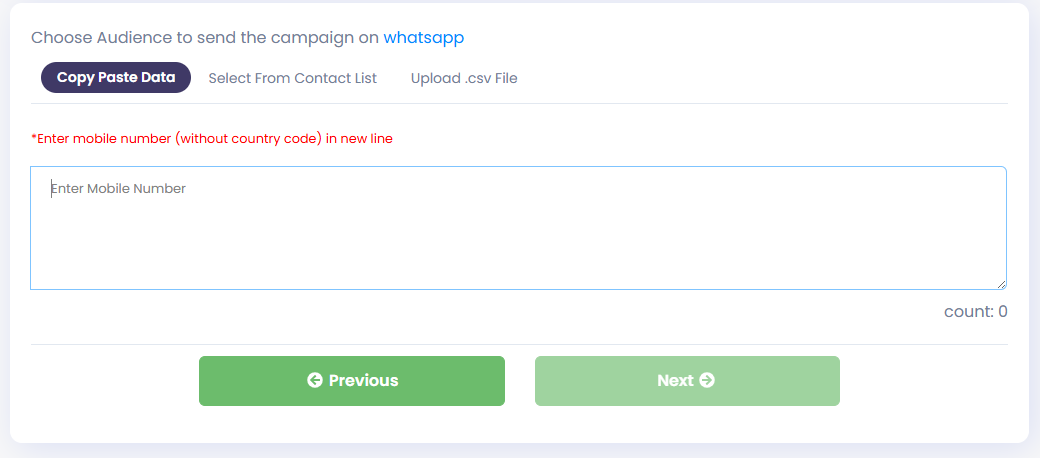
Maintaining a clean, opted-in contact list ensures better delivery rates and protects your messaging quality.
Create & Get Template Approved
After setting up your WhatsApp Business Account, the next step is creating a message template inside the Authkey dashboard.
All promotional and outbound messages must be submitted for approval before sending. Authkey forwards the template request to Meta for review. Approval typically takes only a few minutes if the content follows guidelines.
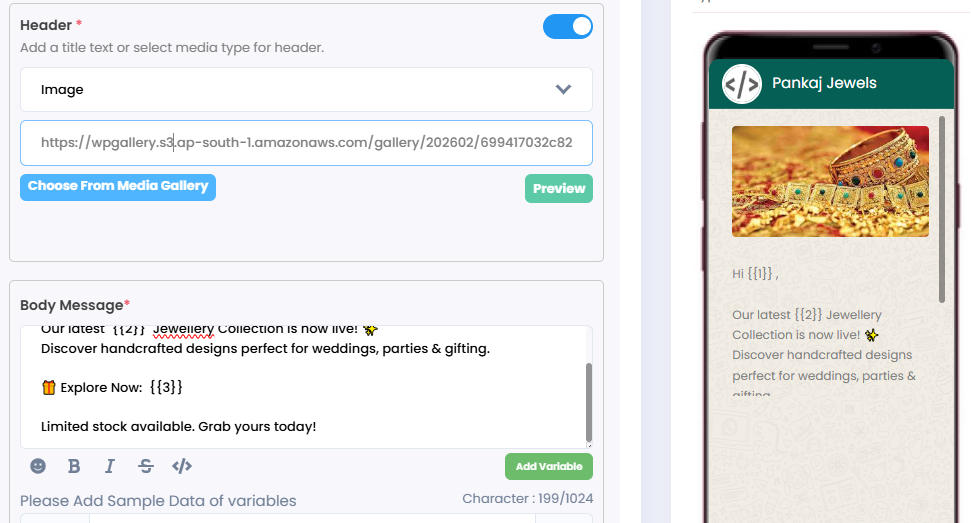
Once approved, the template can be used for broadcast campaigns, offers, reminders, and notifications.
Launch Your Broadcast Campaign
Before launching, carefully review:
- Selected message template
- Variables used in the template
- Chosen contact list
- CTA buttons and links
Once a broadcast campaign is launched, it cannot be recalled. That’s why Authkey recommends sending a test message to your own number before going live.
After verification, simply schedule or launch the campaign directly from the dashboard.
Track Campaign Performance
After your campaign goes live, Authkey provides real-time analytics to help you measure performance.
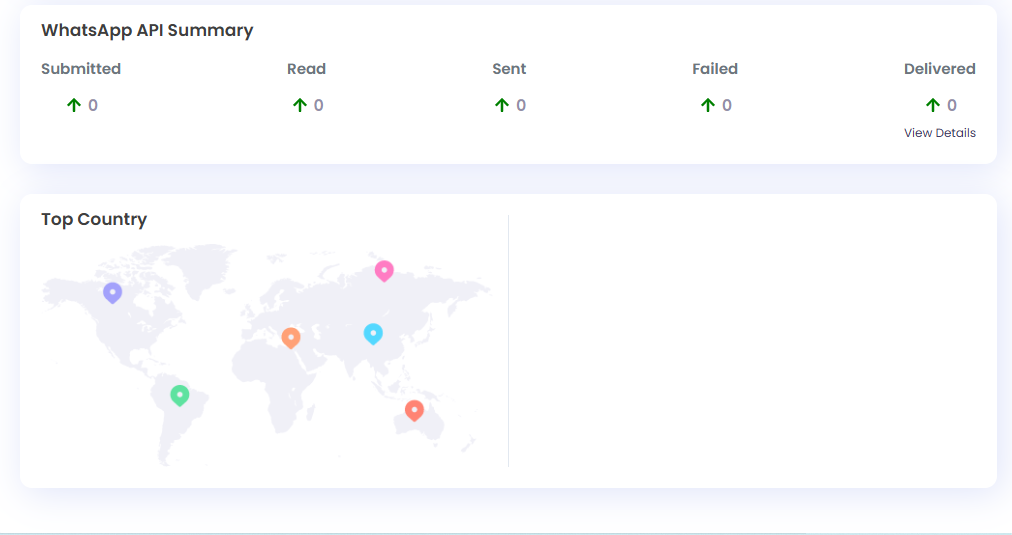
You can track:
- Delivery reports
- Read/open rates
- Clicks on CTA buttons
- Replies and engagement
Additionally, customer responses can be managed through the Authkey Shared Inbox, allowing your team to reply, assign chats, and convert conversations into sales.
With Authkey’s official API integration, automation tools, and detailed analytics, businesses can launch, monitor, and scale WhatsApp broadcast campaigns efficiently and compliantly — all from a single dashboard.
Types of Promotional Messages You Can Send
WhatsApp Broadcast campaigns allow businesses to send a wide variety of promotional messages that drive engagement and conversions. Using the official WhatsApp Business API, businesses can deliver rich, interactive messages directly to opted-in customers.
Here are the most effective types of promotional messages you can send:
Read more: WhatsApp Automation: How to Send Automated Customer Notifications?
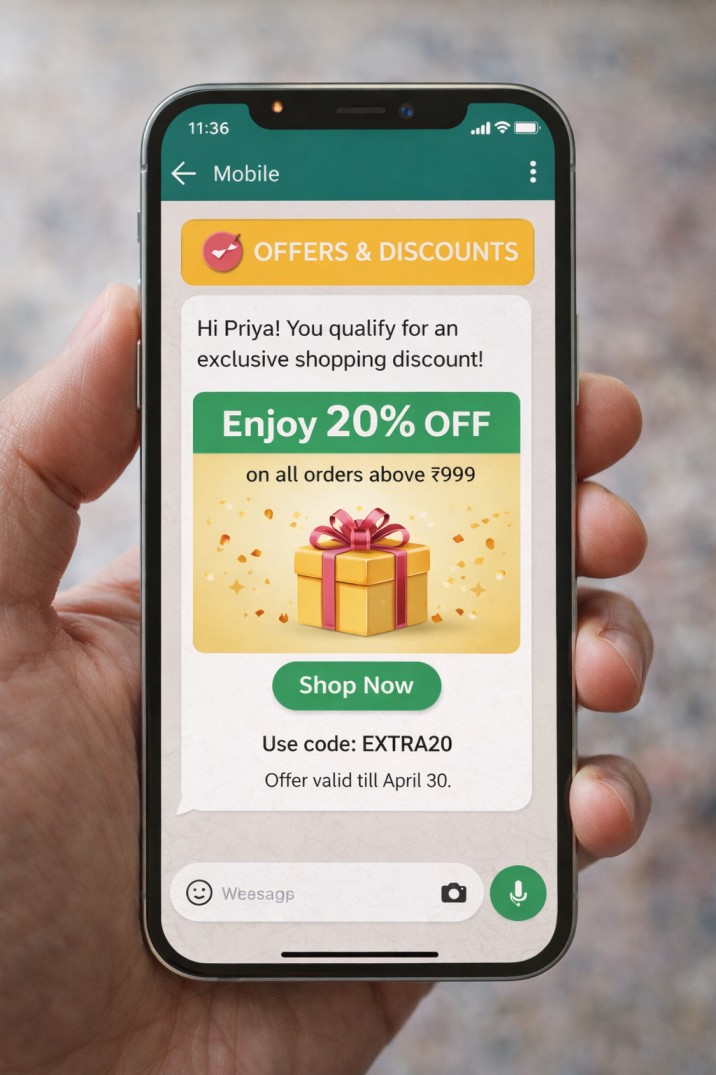
Offers & Discounts
Promote special discounts, seasonal sales, and exclusive deals to your customer list. Adding CTA buttons like “Shop Now” or “Claim Offer” increases click-through rates and conversions.
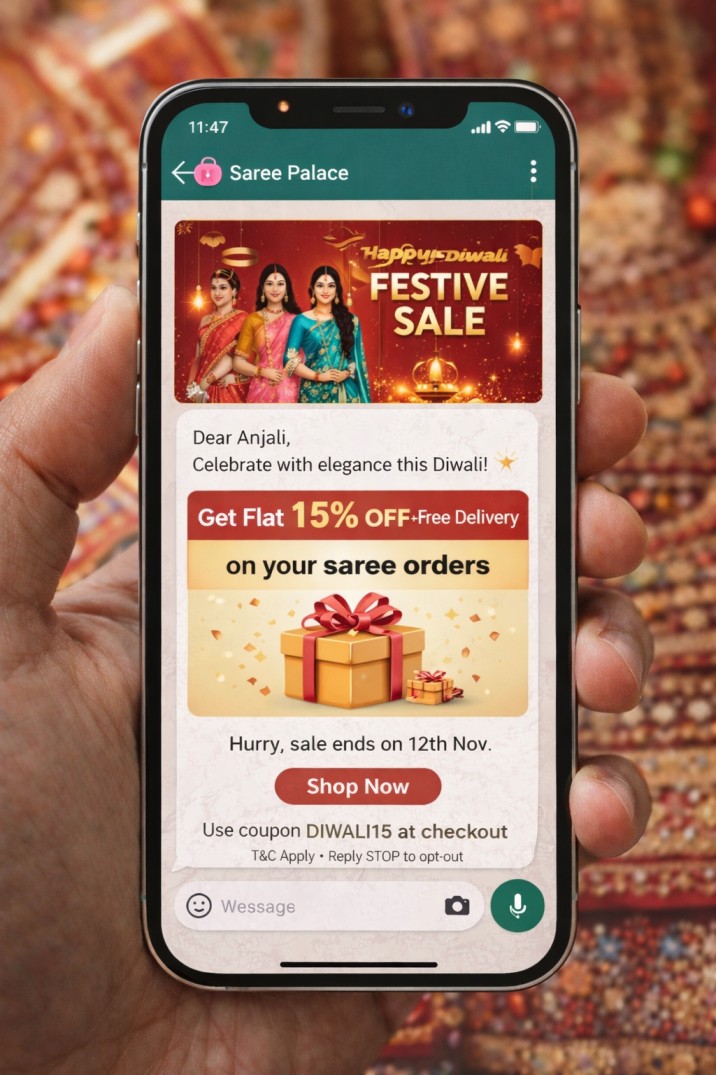
Festival Campaigns
Leverage festive seasons such as Diwali, Christmas, New Year, or regional celebrations to send themed promotions. Festival campaigns often generate high engagement due to timely relevance.
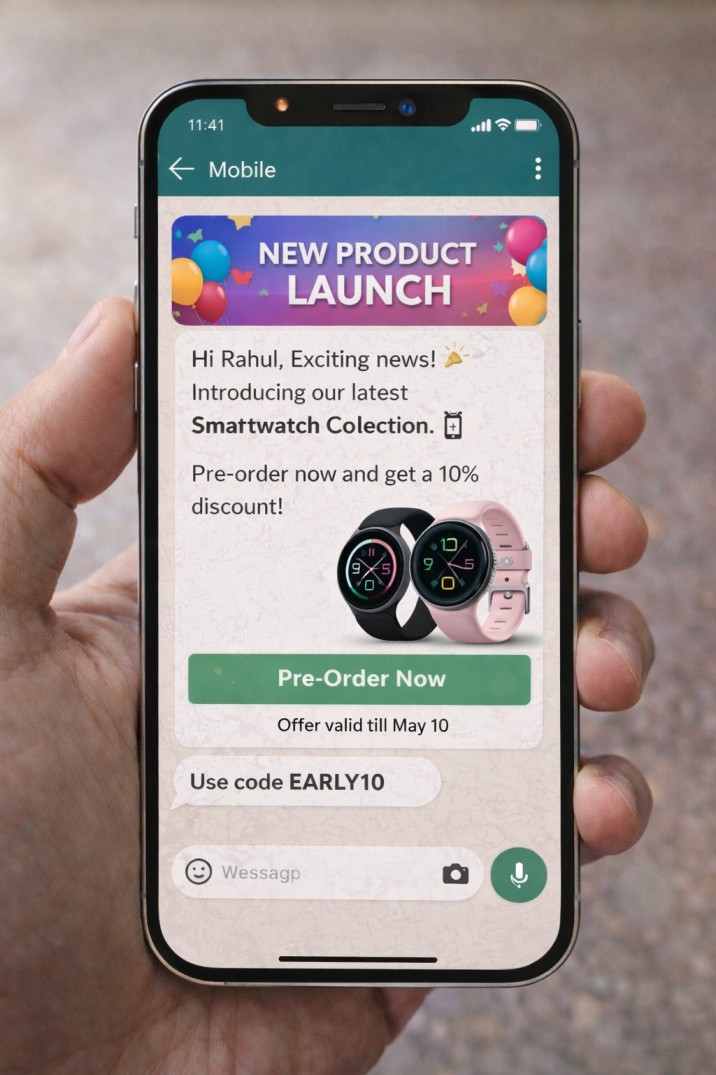
Product Launches
Announce new product releases or service updates with images, videos, or catalog links. WhatsApp broadcast ensures your announcement reaches customers instantly in their personal inbox.
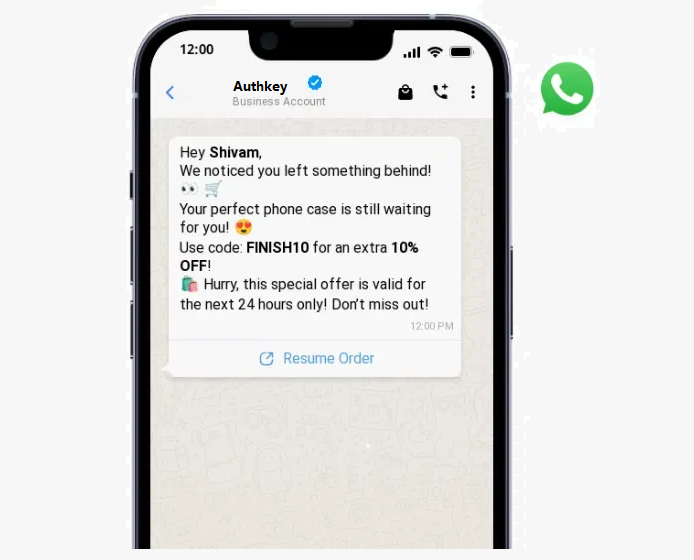
Reminders & Follow-Ups
Send promotional reminders for pending purchases, subscription renewals, upcoming events, or limited-time offers. Follow-up messages help improve conversions and reduce drop-offs.
Coupons and Limited-Time Deals
Create urgency by sending exclusive coupon codes with expiry dates. Time-sensitive campaigns encourage faster customer action and improve campaign performance.
By using the right mix of promotional message types, businesses can maintain consistent engagement while driving measurable sales growth through WhatsApp marketing.
Read More: WhatsApp Ecommerce Store: What It Is and How to Use It for Your Business?
Best Practices for High-Conversion Broadcasts
Running a WhatsApp broadcast campaign is easy — but generating high conversions requires strategy. Following the right best practices ensures better engagement, fewer blocks, and improved campaign performance.
Personalization Tips
Personalized messages always perform better than generic ones. Use the customer’s name, past purchase details, location, or interests to make the message feel relevant. Even small personalization like “Hi Rahul” instead of “Dear Customer” can significantly improve response rates.
Segment your audience based on behavior, purchase history, or interests before sending broadcasts. Targeted messaging leads to higher engagement and lower spam complaints.
Ideal Message Length
Keep your message short, clear, and action-focused. Long paragraphs reduce readability on mobile screens. Aim for:
- 3–5 short lines
- Clear offer or value proposition
- One strong call-to-action
WhatsApp is a chat platform — your message should feel conversational, not like an email newsletter.
Using Images & Videos
Visual content increases engagement dramatically. Adding product images, promotional banners, or short videos makes your message more attractive and improves click-through rates.
Use:
- Product images for e-commerce
- Offer banners for sales
- Short demo videos for product launches
Rich media grabs attention faster than plain text.
Strong CTA Buttons
Always include a clear call-to-action. Tell users exactly what to do next.
Examples:
- Shop Now
- Claim Offer
- Book Appointment
- View Catalog
- Pay Now
CTA buttons reduce friction and increase conversions because customers can act instantly without typing a reply.
Right Timing & Scheduling
Timing directly impacts campaign success. Send broadcasts when your audience is most active.
General best times:
- Late morning (11 AM – 1 PM)
- Evening (5 PM – 8 PM)
Avoid very early mornings or late nights. Also, do not over-message customers. Maintain healthy frequency to avoid fatigue and blocks.
When you combine personalization, concise messaging, rich visuals, clear CTAs, and smart timing, your WhatsApp broadcast campaigns become significantly more effective and conversion-focused.
Common Mistakes to Avoid
WhatsApp Broadcast is a powerful marketing tool, improper usage can reduce engagement and even harm your messaging tier. Avoiding common mistakes ensures long-term success and account safety.
Sending Without Opt-In
One of the biggest mistakes businesses make is sending promotional messages without proper customer consent. WhatsApp strictly requires opt-in before any marketing communication.
Sending messages to users who have not agreed to receive them can result in:
- High block rates
- Spam reports
- Downgraded messaging tier
- Possible account restrictions
Always collect clear opt-ins through website forms, checkout pages, or lead campaigns before running broadcasts.
Spammy or Overly Promotional Content
Messages that look aggressive, misleading, or too sales-heavy can lead to negative engagement. Avoid:
- ALL CAPS messaging
- Excessive emojis
- Fake urgency
- Misleading offers
Instead, focus on value-driven, clear, and relevant communication that solves a customer need.
Ignoring Template Approval Rules
When using the official WhatsApp Business API, promotional messages must be approved as templates before sending. Skipping guidelines or submitting non-compliant content can lead to rejection or campaign delays.
Always follow:
- Clear message intent
- Proper category selection
- No policy violations
Over-Messaging Customers
Sending too many broadcasts within a short time can frustrate users and increase unsubscribe or block rates. Even relevant offers lose effectiveness if customers feel overwhelmed.
Maintain a healthy frequency:
- Send only valuable updates
- Avoid daily promotional blasts
- Segment your audience to reduce repetition
By avoiding these common mistakes, businesses can protect their account quality, improve engagement rates, and scale WhatsApp marketing campaigns safely and effectively.
Measuring Broadcast Campaign Success
Launching a WhatsApp broadcast campaign is only the first step. To improve performance and maximize ROI, businesses must track key metrics that indicate engagement and effectiveness. Using the official WhatsApp Business API, you can monitor detailed campaign analytics and optimize future broadcasts accordingly.
Delivery Rate
Delivery rate shows how many messages were successfully delivered to users out of the total sent. A high delivery rate indicates:
- Clean, valid contact data
- Active WhatsApp numbers
- Strong account quality rating
Low delivery rates may signal outdated numbers or compliance issues.
Read Rate
Read rate measures how many recipients opened and viewed your message. WhatsApp typically achieves much higher read rates compared to email marketing.
A strong read rate indicates:
- Good timing
- Relevant audience targeting
- Engaging message preview
Clicks on CTA
Click-through rate (CTR) shows how many users clicked on your call-to-action button or link. This metric directly reflects how compelling your offer and message content are.
If CTR is low, consider:
- Improving your offer
- Making CTA more clear and action-driven
- Adding better visuals
Replies and Conversions
Replies indicate active engagement. Since WhatsApp supports two-way communication, responses can lead directly to conversations and sales.
Conversions measure the final business outcome — purchases, registrations, bookings, or payments. This is the most important metric for evaluating campaign ROI.
By consistently analyzing delivery, reads, clicks, and conversions, businesses can refine their broadcast strategy and continuously improve campaign performance.
Conclusion
WhatsApp Broadcast marketing has emerged as one of the most powerful growth tools for modern businesses and Authkey helps brands unlock its full potential safely and at scale. WhatsApp marketing by combining high visibility, direct inbox delivery, rich media capabilities and real-time two-way engagement, through Authkey delivers far better results than traditional email or SMS campaigns. Businesses can drive sales, improve retention, automate follow-ups and build stronger customer relationships.
However, true scalability requires the right infrastructure. That’s where Authkey stands out. As an official solution built on the WhatsApp Business API, Authkey ensures businesses operate within Meta’s compliance regulations. This includes verified business profiles, approved message templates, secure delivery channels and structured opt-in management. By maintaining strong engagement quality and low spam rates, businesses using Authkey can gradually increase their messaging tiers and expand their daily outreach capacity.
With Authkey’s advanced automation, segmentation, analytics and broadcast management tools, businesses can confidently scale from hundreds to thousands and eventually lakhs of messages per day without risking number bans. More importantly, Authkey transforms bulk messaging into meaningful, personalized conversations that drive measurable growth.
WhatsApp Broadcast is not just about sending messages, it’s about building compliant, scalable and high-converting customer communication. And with Authkey, businesses can do it the right way.
Ready to take your business communication to the next level? 🚀
Start leveraging the power of the official WhatsApp Business API to automate conversations, send bulk campaigns and engage customers at scale.
For a growing startup or an enterprise brand, the right WhatsApp solution can transform your marketing results. Get started today and turn every message into a meaningful customer connection.