
Many businesses struggle to understand the difference between the WhatsApp Business App, WhatsApp Business API and the WhatsApp Cloud API. These terms are often used interchangeably across blogs and platforms, creating confusion when companies try to choose the right solution for messaging, automation and customer support.
Adding to this confusion is Meta’s major shift from the legacy On-Premise WhatsApp Business API to the Cloud API, where hosting, maintenance and infrastructure are now handled directly by Meta. This transition has completely changed how businesses integrate WhatsApp, how developers build on it and whether a Business Solution Provider (BSP) is still required.
In 2026, understanding these differences is no longer optional. Choosing the wrong setup can lead to unnecessary BSP costs, limited scalability, longer onboarding times, or selecting a solution that doesn’t match your technical or business needs.
This is where Authkey plays a crucial role.
Authkey is built on top of the WhatsApp API and helps businesses use WhatsApp without worrying about servers, BSP dependencies, or complex development work. It provides the essential tools that the Cloud API alone does not offer—such as a shared inbox for teams, CRM, automation, campaign tools and analytics.
In this guide, we will clearly explain:
- The difference between WhatsApp Business App, Business API and Cloud API
- How Meta’s Cloud API changes the architecture and cost model
- Which option is right for your business or development team
- What you actually need to get started with WhatsApp messaging today using Authkey
Evolution of WhatsApp for Businesses
WhatsApp’s role in business communication has changed dramatically over the years. What began as a simple chat tool for small shop owners has evolved into a powerful platform used by enterprises for customer support, notifications, marketing and automation. To understand why the WhatsApp Cloud API exists today, it’s important to look at how WhatsApp’s business solutions have evolved over time.
WhatsApp Business App – Built for Small Businesses
The WhatsApp Business App was the first official step by WhatsApp to support businesses. It was designed mainly for small shops, freelancers and local businesses that needed a simple way to chat with customers.
With this app, businesses could:
- Reply to customers manually from a mobile device
- Use quick replies, labels and product catalogs
- Manage conversations on a single phone (with limited device support)
However, the Business App had clear limitations. There was no API access, no automation, no CRM integration and no way for multiple agents to handle chats together. As businesses grew, this setup quickly became insufficient.
WhatsApp Business API – The BSP and On-Premise Era
To support medium and large businesses, WhatsApp introduced the WhatsApp Business API. This allowed companies to send and receive messages programmatically and integrate WhatsApp with their software, CRM and support systems.
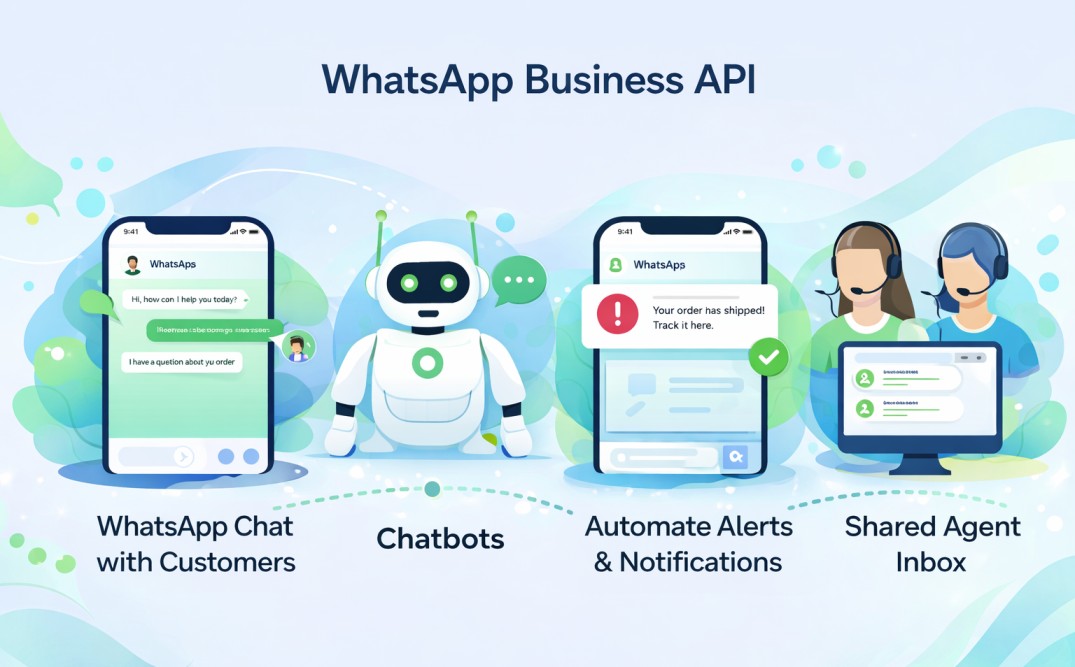
But access to this API was not direct.
Businesses had to:
- Work with a Business Solution Provider (BSP) such as Authkey.
- Host the API on servers (either on-premise or managed by the BSP)
- Pay BSP platform/hosting fees in addition to WhatsApp’s messaging charges
- Go through a longer onboarding and approval process
This model enabled automation and scale, it also made WhatsApp integration more complex, more expensive and dependent on third-party providers for infrastructure and support.
WhatsApp Cloud API – The Meta-Hosted Future
To remove these complexities, Meta introduced the WhatsApp Cloud API.
With the Cloud API:
- Hosting and infrastructure are managed directly by Meta
- No server setup or BSP hosting is required
- Businesses can onboard faster through the Meta Developer Portal
- Only WhatsApp conversation charges apply (no BSP platform fees)
- Updates, security and scalability are handled automatically by Meta
The Cloud API delivers the same core capabilities as the Business API but in a much simpler, faster and more cost-effective way.
Why Meta Introduced the Cloud API?
Meta introduced the Cloud API to modernize how businesses integrate with WhatsApp. The goals were to:
- Eliminate dependency on on-premise servers
- Reduce reliance on BSPs for infrastructure
- Lower the overall cost of adoption
- Simplify onboarding for developers and businesses
- Standardize integrations using the Graph API
This shift is also why Meta has sunsetted the legacy On-Premise API and is positioning the Cloud API as the default and future-ready way to build WhatsApp messaging solutions.
Understanding this evolution makes it much easier to decide which WhatsApp solution fits your business needs today.
What is WhatsApp Business API?
The WhatsApp Business API was introduced to help medium and large businesses communicate with customers at scale using automation, CRM integrations and multi-agent support. Unlike the WhatsApp Business App, this API allows companies to send and receive messages programmatically through their software systems.
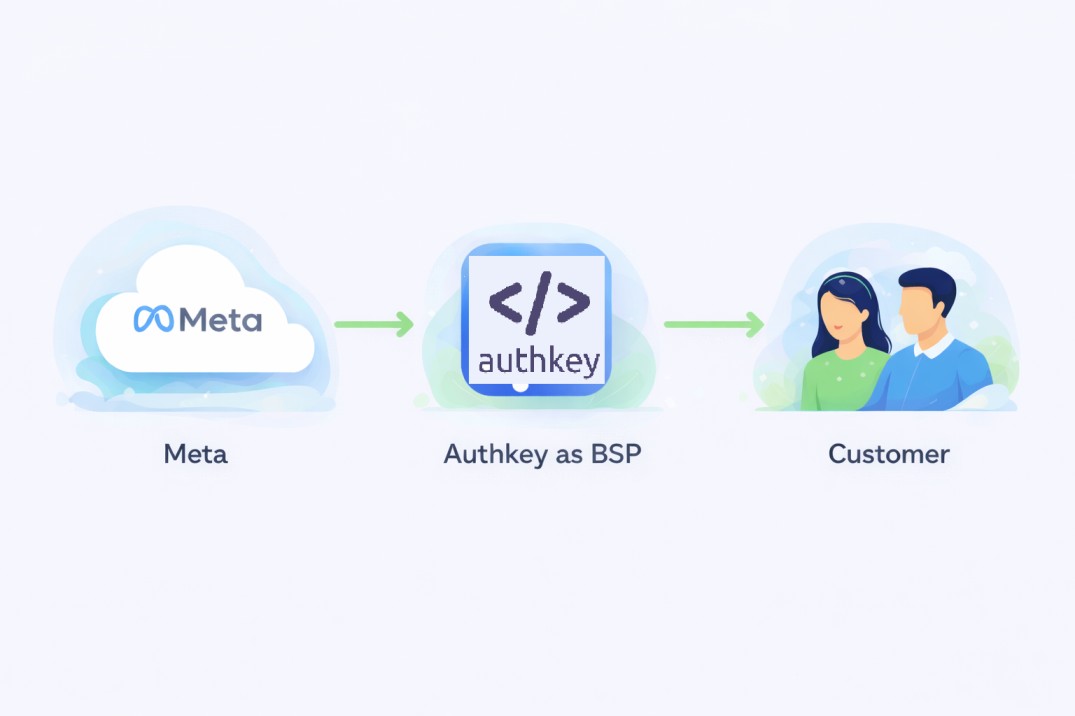
In its original model, businesses could not access the API directly from Meta. Instead, they had to go through Business Solution Providers (BSPs) such as Authkey, Twilio, WATI, Gupshup, 360dialog and others.
These BSPs acted as intermediaries by:
- Hosting the WhatsApp API on their servers (or managing on-premise setups)
- Handling onboarding, approvals and technical setup
- Providing dashboards, inboxes and support tools on top of the API
Because of this structure, using the WhatsApp Business API typically required:
- Dedicated server/infrastructure managed by the BSP or business
- Paying BSP platform/hosting fees in addition to WhatsApp’s conversation charges
- A longer onboarding process involving BSP coordination and approvals
- A setup more suited for enterprise-level businesses with technical and compliance needs
While this model enabled powerful integrations and scalability, it also made WhatsApp adoption more complex, costly and dependent on third-party providers for infrastructure and maintenance.
What is WhatsApp Cloud API?
The WhatsApp Cloud API is the modern, Meta-hosted version of the WhatsApp Business Platform that allows businesses and developers to integrate WhatsApp messaging directly into their applications—without relying on external hosting or a Business Solution Provider (BSP).
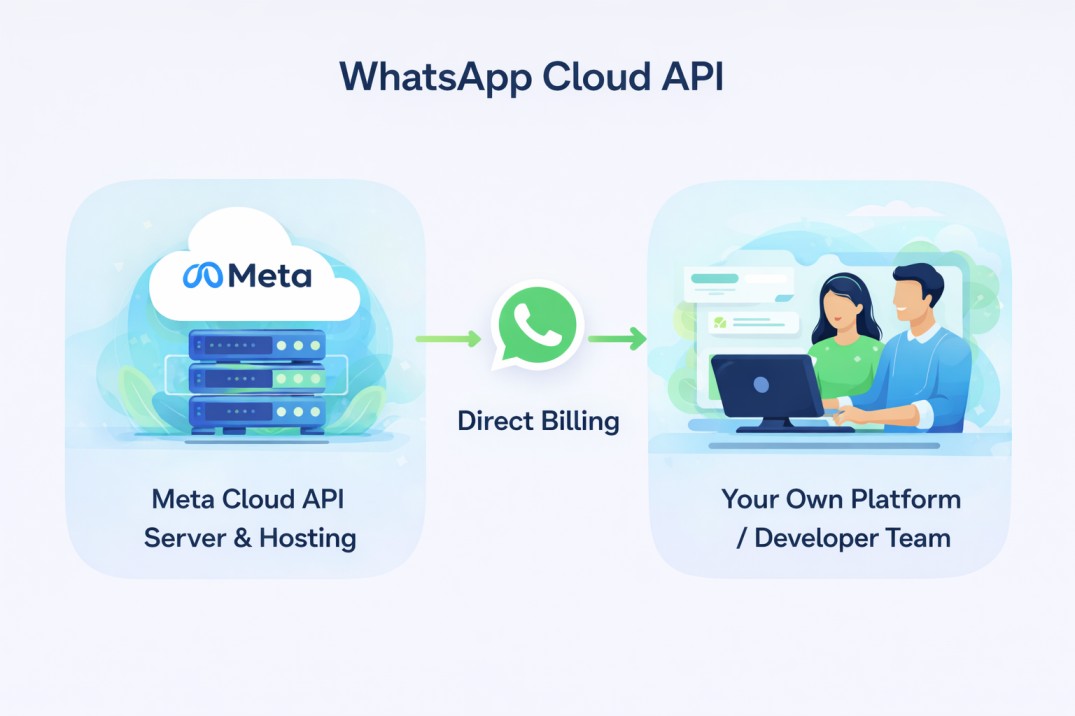
Unlike the earlier Business API model, the Cloud API is hosted entirely by Meta on its own infrastructure. This means businesses no longer need to set up servers or depend on BSPs to manage the API environment.
With WhatsApp Cloud API:
- Hosting and infrastructure are managed directly by Meta
- No BSP or server setup is required
- Onboarding is much faster through the Meta Developer Portal
- Businesses pay only WhatsApp conversation charges (no BSP platform fees)
- Integration is done using Meta’s Graph API endpoints
The Cloud API provides the same core messaging capabilities as the traditional Business API—such as sending text, template and media messages—but in a simpler, more scalable and cost-effective way for modern businesses and developers.
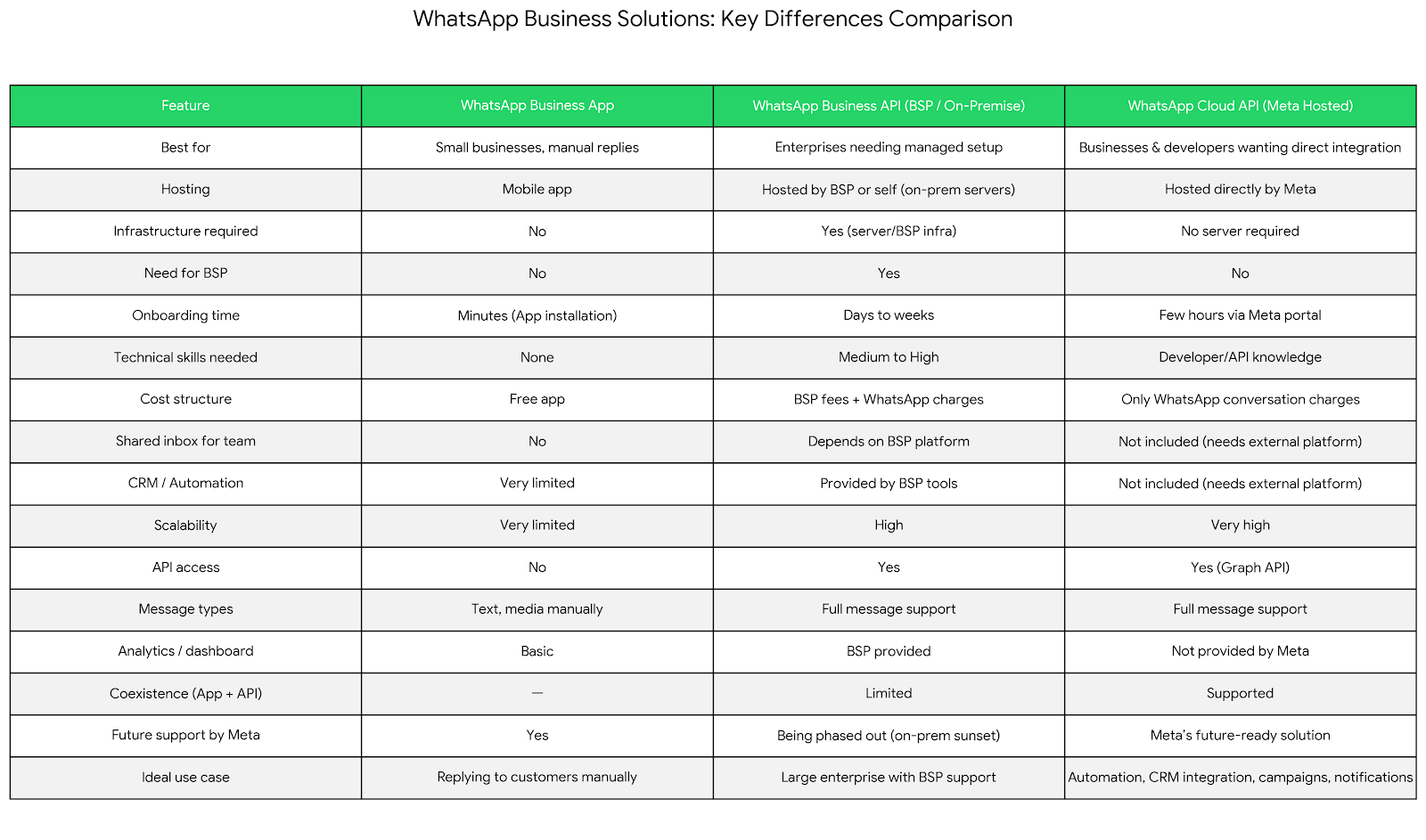
Key Differences Table
| Feature | WhatsApp Business App | WhatsApp Business API (BSP / On-Premise) | WhatsApp Cloud API (Meta Hosted) |
| Best for | Small businesses, manual replies | Enterprises needing managed setup | Businesses & developers wanting direct integration |
| Hosting | Mobile app | Hosted by BSP or self (on-prem servers) | Hosted directly by Meta |
| Infrastructure required | No | Yes (server/BSP infra) | No server required |
| Need for BSP | No | Yes | No |
| Onboarding time | Minutes(App installation) | Days to weeks | Few hours via Meta portal |
| Technical skills needed | None | Medium to High | Developer/API knowledge |
| Cost structure | Free app | BSP fees + WhatsApp charges | Only WhatsApp conversation charges |
| Shared inbox for team | No | Depends on BSP platform | Not included (needs external platform) |
| CRM / Automation | Very limited | Provided by BSP tools | Not included (needs external platform) |
| Scalability | Very limited | High | Very high |
| API access | No | Yes | Yes (Graph API) |
| Message types | Text, media manually | Full message support | Full message support |
| Analytics / dashboard | Basic | BSP provided | Not provided by Meta |
| Coexistence (App + API) | — | Limited | Supported |
| Future support by Meta | Yes | Being phased out (on-prem sunset) | Meta’s future-ready solution |
| Ideal use case | Replying to customers manually | Large enterprise with BSP support | Automation, CRM integration, campaigns, notifications |
What WhatsApp Cloud API Does NOT Provide (Common Misunderstanding)
A very common misconception is that the WhatsApp Cloud API comes with a ready-to-use interface for managing chats, agents, customers and campaigns.
It does not.
The Cloud API is only an API layer that allows you to programmatically send and receive WhatsApp messages. It is designed for developers to build on top of—not as a complete business messaging tool by itself.
Out of the box, WhatsApp Cloud API does not include:
- A shared inbox for multiple agents to reply to customers
- A CRM to store and manage contacts or conversation history
- A chat dashboard or user interface to view messages
- Built-in automation or workflow builders
- Analytics or reporting dashboards
This is why businesses typically use a platform, CRM, or custom application on top of the Cloud API.
In a practical setup, the architecture looks like this:
Your Platform / CRM / Application → WhatsApp Cloud API (Meta) → Customer
The Cloud API handles message delivery, while your platform handles:
- Agent access
- Contact management
- Automation rules
- Campaigns
- Reporting and analytics
Understanding this distinction is crucial when choosing WhatsApp Cloud API, as you will either need to build these features yourself or use a solution that already provides them on top of the API.
Cost Comparison: BSP Platform Charges vs Meta Cloud API Pricing
One of the biggest reasons businesses are moving from the traditional WhatsApp Business API (via BSPs) to the WhatsApp Cloud API is cost.
Under the older Business API model, businesses did not pay only for WhatsApp messages. They also had to pay platform and hosting fees to the Business Solution Provider (BSP).
Cost Structure with BSP (Business API)
When using a BSP like Authkey, there is no fixed monthly fee. Instead, you pay a small charge per message template, making it a cost-effective pay-as-you-use model.
- Authkey has no monthly or annual BSP platform/license fees.
- Hosting and infrastructure charges
- WhatsApp conversation charges from Meta
- Additional fees for features like inbox, automation, or CRM tools
Check WhatsApp Business API Pricing
Cost Structure with WhatsApp Cloud API
With the WhatsApp Cloud API, Meta removes the middle layer by hosting the API directly on its own servers.
Businesses can integrate their WhatsApp Cloud API directly with Meta. In this setup, Authkey does not play any role in billing for WhatsApp message template charges, as those are paid directly to Meta.
However, businesses can still choose to use the Authkey platform (panel software) on a rental basis for managing chats, automation, and operations. The platform pricing depends on usage volume.
Businesses Pay Separately For:
- Meta’s WhatsApp template/message charges (paid directly to Meta)
- Authkey platform usage charges (if using the Authkey panel)
No Additional Costs Such As:
- No hosting fees
- No BSP platform fees
- No infrastructure or server maintenance costs
Since Meta hosts the API infrastructure, businesses do not need to worry about server management or maintenance expenses.
Why Cloud API is More Cost-Effective
Because it eliminates BSP hosting and platform fees, the Cloud API significantly reduces the total cost of ownership while providing the same messaging capabilities.
For businesses and developers who can manage their own integrations or use a platform on top of the API, the Cloud API becomes the most economical and scalable way to use WhatsApp for business messaging.
Use Case: When to Choose WhatsApp Business API vs WhatsApp Cloud API
Both the WhatsApp Business API (via BSPs) and the WhatsApp Cloud API allow businesses to send and receive messages at scale. The right choice depends on your technical resources, compliance requirements, budget and how quickly you want to get started.
Choose WhatsApp Business API (via BSP as Authkey) if:
You may prefer the traditional Business API model when:
- You want BSP-managed support for setup, hosting and ongoing maintenance
- Your organization has complex enterprise compliance or security requirements that require dedicated environments
- You prefer a fully managed solution where a provider handles infrastructure, monitoring and support
- You rely heavily on the BSP’s built-in tools, dashboards, or integrations
This model suits enterprises that value managed services over direct control and are comfortable with the additional platform costs.
Choose WhatsApp Cloud API if:
The Cloud API is a better fit when:
- You want a lower-cost setup without BSP platform or hosting fees
- You need a faster go-live through Meta’s self-service developer onboarding
- You have developers or a tech team who can handle API integration
- You want a future-proof setup aligned with Meta’s direction for WhatsApp integrations
For most modern businesses and SaaS platforms, the Cloud API offers the same capabilities in a simpler, more scalable and more economical way.
Meta Deprecating On-Premise API (Important 2026 Update)
Meta has officially moved away from the legacy On-Premise WhatsApp Business API model and is standardizing all new and existing integrations around the WhatsApp Cloud API.
On-Premise API Sunset
The older On-Premise API required businesses or BSPs to host WhatsApp services on dedicated servers. This model involved infrastructure management, manual updates and higher operational complexity.
Meta has now sunset this model and no longer promotes or supports new On-Premise deployments for WhatsApp Business integrations.
Mandatory Migration to Cloud API
Businesses that were previously using the On-Premise API (directly or via BSPs) are required to migrate their setup to the WhatsApp Cloud API to continue using WhatsApp messaging without disruption.
This migration ensures:
- Continued compatibility with Meta’s updates
- Better scalability and reliability
- Removal of infrastructure and maintenance burdens
Why Businesses Must Plan the Shift
Delaying this transition can lead to:
- Integration issues with outdated infrastructure
- Higher maintenance costs
- Compatibility risks as Meta rolls out new features only on Cloud API
- Dependence on legacy systems that are no longer future-ready
Planning the shift to the Cloud API is essential for businesses that want to keep their WhatsApp communication scalable, compliant and aligned with Meta’s long-term platform direction.
Can You Use WhatsApp Business App and Cloud API Together? (Coexistence)
Earlier, businesses had to choose between using the WhatsApp Business App or the WhatsApp Business API. Using both on the same number was not allowed, which limited how teams could combine manual replies with automation.
Meta has now introduced a feature called Coexistence, which changes this.
What is the Coexistence Feature?
Coexistence allows a business to use the same WhatsApp phone number with:
- The WhatsApp Business App (for manual, human replies) and
- The WhatsApp Cloud API (for automation, integrations and programmatic messaging)
This means businesses no longer have to sacrifice human interaction to enable automation.
Human + Automation Use Case
With coexistence enabled, the setup works like this:
- Automated messages, notifications and workflows run through the Cloud API
- Support agents or business owners can still open the WhatsApp Business App and reply to customers manually when needed
This is especially useful for:
- Small teams starting with the app and gradually adding automation
- Support teams that want both CRM-driven messaging and personal responses
- Businesses that want the flexibility of human conversations along with API-powered workflows
Coexistence bridges the gap between simplicity and scale, allowing businesses to combine the strengths of both the WhatsApp Business App and the Cloud API in a single setup.
Conclusion
Choosing between the WhatsApp Business App, WhatsApp Business API (via BSP) and the WhatsApp Cloud API comes down to your business size, technical capability, budget and long-term goals.
- The WhatsApp Business App is ideal for small businesses handling chats manually.
- The WhatsApp Business API (BSP model) was built for enterprises needing managed infrastructure and support, but often comes with higher costs and complexity.
- The WhatsApp Cloud API is Meta’s modern, future-ready approach—offering the same powerful capabilities without server setup, BSP dependency, or extra platform fees.
Understanding these differences helps you avoid unnecessary costs, reduce onboarding time and choose a setup that scales with your business.
If you’re planning to integrate WhatsApp into your software, CRM, or customer communication workflow, the WhatsApp Cloud API is the most efficient path forward.
Our platform helps you get started quickly with:
- Ready-to-use shared inbox for agents
- CRM and contact management
- Automation and campaign tools
- Analytics and reporting on top of WhatsApp Cloud API
Start building smarter WhatsApp communication today with a solution designed for both businesses and developers.
Frequently Asked Questions
1. What is the difference between WhatsApp Cloud API and WhatsApp Business API?
The WhatsApp Business API earlier required hosting through BSPs or on-premise servers, which added infrastructure and platform costs. The WhatsApp Cloud API is hosted directly by Meta and removes the need for server setup. With Authkey, you can use the Cloud API along with a ready-to-use inbox, CRM and automation tools without worrying about infrastructure.
2. Do I need a Business Solution Provider (BSP) to use WhatsApp Cloud API?
No. WhatsApp Cloud API can be accessed directly via Meta. However, to manage chats, agents, campaigns and automation easily, you can use a platform like Authkey built on top of the Cloud API.
3. Is WhatsApp Cloud API free to use?
There are no hosting or platform fees from Meta. You only pay WhatsApp conversation charges. When using Authkey, you get additional tools like shared inbox, CRM and analytics on top of the Cloud API.
4. Does WhatsApp Cloud API provide a shared inbox or chat dashboard?
No. Cloud API only provides messaging endpoints. Authkey provides a complete shared inbox, agent panel, contact management and dashboard on top of the API.
5. Can I use the WhatsApp Business App and Cloud API on the same number?
Yes. With the coexistence feature, you can use both. Many businesses use the WhatsApp Business App for manual replies while running automation and campaigns through Authkey using the Cloud API(not yet ready to use).
6. Can I migrate from WhatsApp Business API (BSP/On-Premise) to Cloud API?
Yes. Authkey helps businesses migrate from legacy BSP-hosted APIs to the modern WhatsApp Cloud API without disruption.
7. What do I need to start using WhatsApp Cloud API?
You need a Meta Developer account, Business Manager verification, WABA, Phone Number ID and access token. Authkey assists you with the complete setup and integration.
8. What types of messages can be sent using WhatsApp Cloud API?
You can send text, template, image, document, video and interactive messages. Authkey makes it easy to send all these through a user-friendly dashboard.
9. Is WhatsApp Cloud API suitable for small and medium businesses?
Yes, especially when combined with a platform like Authkey that removes technical complexity and provides ready-to-use tools for messaging, automation and support.
10. Why should I use Authkey with WhatsApp Cloud API?
Because Cloud API alone does not provide inbox, CRM, automation, or analytics. Authkey bridges this gap and helps you use WhatsApp for customer support, notifications, marketing and engagement without building everything from scratch.