
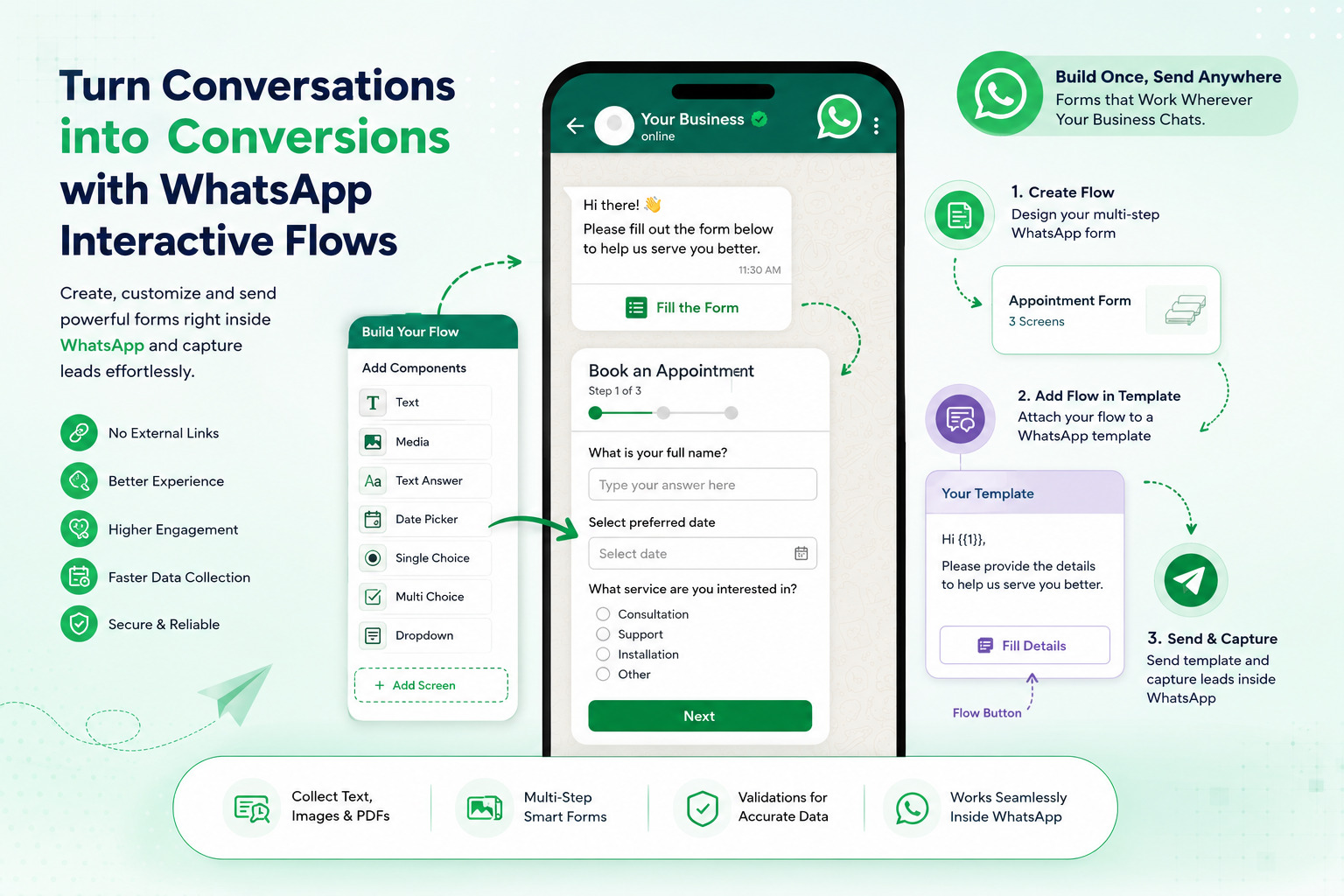
Businesses today need more than simple WhatsApp messaging. Whether you’re collecting customer feedback, booking appointments, capturing leads, gathering delivery details, or conducting surveys, switching customers to external forms often results in drop-offs and lower conversion rates. With Authkey WhatsApp Flow Builders, you can create interactive forms directly inside WhatsApp and collect customer information without redirecting users to any external website.
In this guide, you’ll learn:
- What WhatsApp Flows are
- How to create a WhatsApp Flow in Authkey
- How to design interactive forms
- How to send forms using WhatsApp Templates
- Best use cases for WhatsApp Flows
What is WhatsApp Flow Builder?
WhatsApp Flow Builder allows businesses to create interactive multi-step forms that customers can complete directly within WhatsApp.
Instead of sending customers to external landing pages or websites, businesses can collect information inside the WhatsApp chat itself, creating a seamless and engaging experience.
Popular Use Cases
- Lead Generation Forms
- Appointment Booking
- Customer Feedback Collection
- Delivery Address Collection
- Service Requests
- Event Registrations
- Loan & Insurance Applications
- Customer Surveys
Before You Start
To create and send WhatsApp Flows, you need:
Step 1: Sign Up or Login to Authkey
Login to your Authkey account or create a new account if you’re a new user.
Step 2: Complete WhatsApp Onboarding
Connect and verify your WhatsApp Business Account through Meta Business Manager.
Once your WhatsApp number is verified and approved, you’re ready to create and send WhatsApp Flows.
How to Create a WhatsApp Flow
Navigate to:
Dashboard → WhatsApp → WhatsApp Flow Builder
Here you’ll find two options:
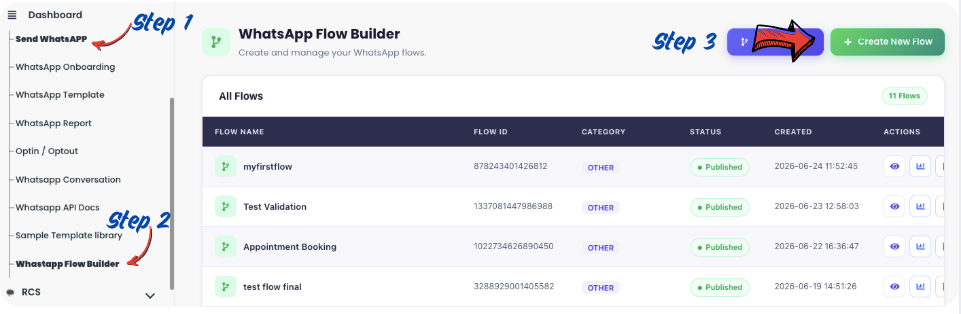
Create New Flow
Create a new form from scratch.
Migrate Existing Flow
Already using another provider?
Simply click Migrate Flow and import your existing WhatsApp Flows into Authkey.
Create Your First WhatsApp Flow
Click Create New Flow.
The flow builder screen will open.
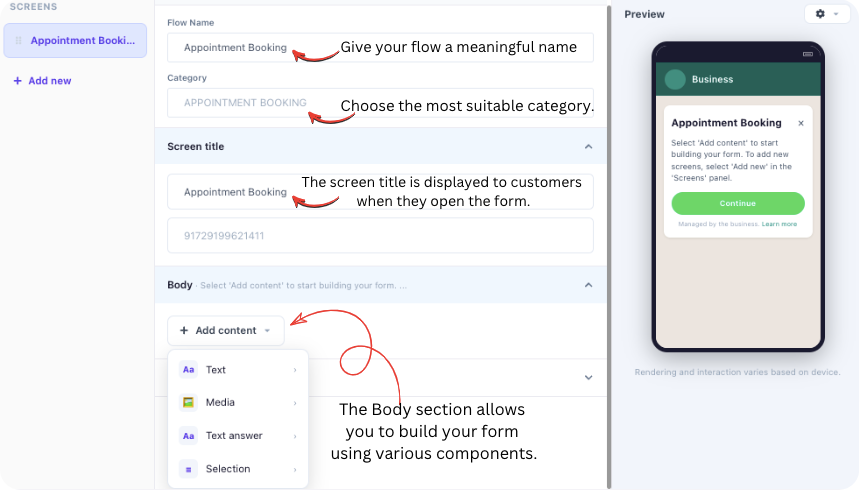
Step 1: Enter Flow Details
Fill in the basic information:
Flow Name
- Give your flow a meaningful name, such as:
- Appointment Booking
- Delivery Address
- Customer Feedback
- Lead Generation Form
Category
Choose the most suitable category.
If you’re creating a custom form, select:
Others
Screen Title
The screen title is displayed to customers when they open the form.
Make sure it clearly describes the purpose of the flow.
Examples:
- Book an Appointment
- Share Your Delivery Address
- Customer Feedback Form
Step 2: Design Your Form
The Body section allows you to build your form using various components.
Simply drag, drop, and arrange fields in the desired order.
Text Components
Use text blocks to provide instructions and information.
Available options include:
- Large Heading
- Small Heading
- Caption
- Body Text
These are useful for explaining the purpose of the form and guiding customers through the process.
Media Upload
Need customers to submit documents? Use the Media Upload component.
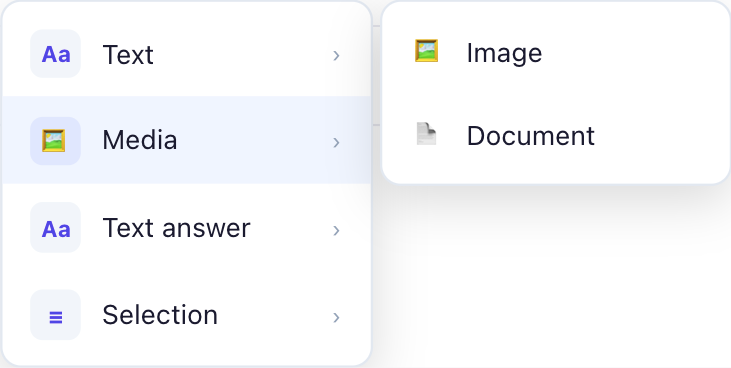
Supported uploads include:
- Images
- PDF Documents
Perfect for:
- KYC Verification
- Insurance Claims
- Proof of Address
- Identity Documents
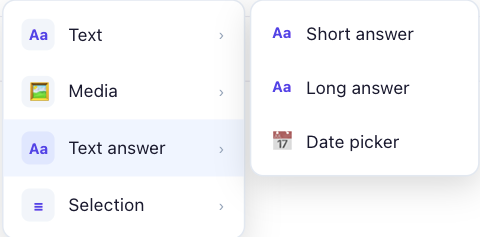
Text Answer
Collect user information through text fields.
Short Answer
Ideal for:
- Name
- Email Address
- Phone Number
- Password
- Amount
- Passcode
You can also apply validations to ensure customers enter data in the correct format.
Long Answer
Use long answer fields when detailed information is required.
Examples:
- Customer Feedback
- Additional Notes
- Service Requirements
- Complaint Descriptions
Date Picker
The Date Picker component allows customers to select dates directly from a calendar.
Ideal for:
- Appointment Scheduling
- Event Registration
- Delivery Dates
- Service Bookings
Selection Options
Collect responses using:
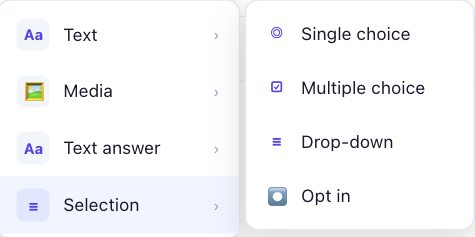
- Single Choice
- Multiple Choice
- Dropdown Menu
- Optional Selection Fields
Perfect for:
- Product Preferences
- Service Categories
- Location Selection
- Survey Questions
Customize the Submit Button
You can also modify the action button text according to your use case.
Examples:
- Submit
- Book Now
- Continue
- Confirm
- Send Request
*Important Note*
A single screen can contain up to 10 cards/components.
If your form requires more fields, create multiple screens.
Creating Multi-Step Forms
For larger forms, you can easily create multiple screens.
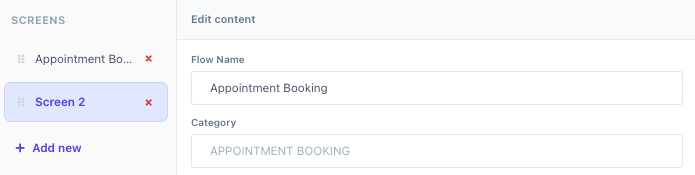
Simply click:
- Add Screen
- from the left panel.
- Then continue adding fields and designing each step of the customer journey.
- Multi-step forms help improve user experience and make lengthy forms easier to complete.
How to Send a WhatsApp Flow to Customers
After creating your flow, the next step is to send it through a WhatsApp Template.
Step 1: Create a WhatsApp Template
Navigate to:
Dashboard → WhatsApp → Templates
Click:
Create New Template
Design your template as per your business requirements.
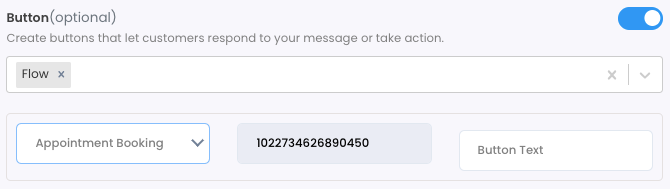
Step 2: Add a Flow Button
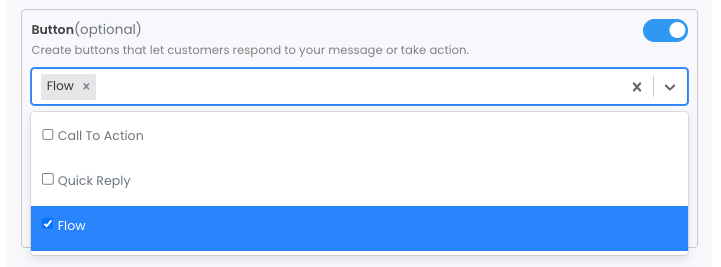
While configuring buttons:
- Click the Add Button
- Select Flow
- Choose the WhatsApp Flow you created
- Save and submit the template
Once approved, the template becomes ready to use.
Step 3: Send the Template
Send the approved template through:
- Campaigns
- APIs
- Chatbot Automation
- Broadcast Messages
When customers receive the message and click the Flow button, the form opens directly inside WhatsApp.
Customers can fill out the form without leaving the chat.
Benefits of Using Authkey WhatsApp Flow Builder
- Higher Conversion Rates
No external links or landing pages required. - Better Customer Experience
Customers stay within WhatsApp throughout the entire process. - Faster Data Collection
Capture customer details instantly. - Multi-Step Interactive Forms
Build complex workflows without coding. - Secure Document Collection
Allow customers to upload images and PDFs directly through WhatsApp. - Easy Integration
Send flows using approved WhatsApp Templates, APIs, campaigns, and chatbot automation.
Start Building WhatsApp Flows Today
With Authkey WhatsApp Flow Builder, businesses can create powerful interactive forms and collect customer information directly inside WhatsApp.
Whether you’re generating leads, collecting feedback, booking appointments, or capturing delivery details, WhatsApp Flows provide a faster and more engaging customer experience.
Log in to your Authkey account today and create your first WhatsApp Flow in just a few minutes.