
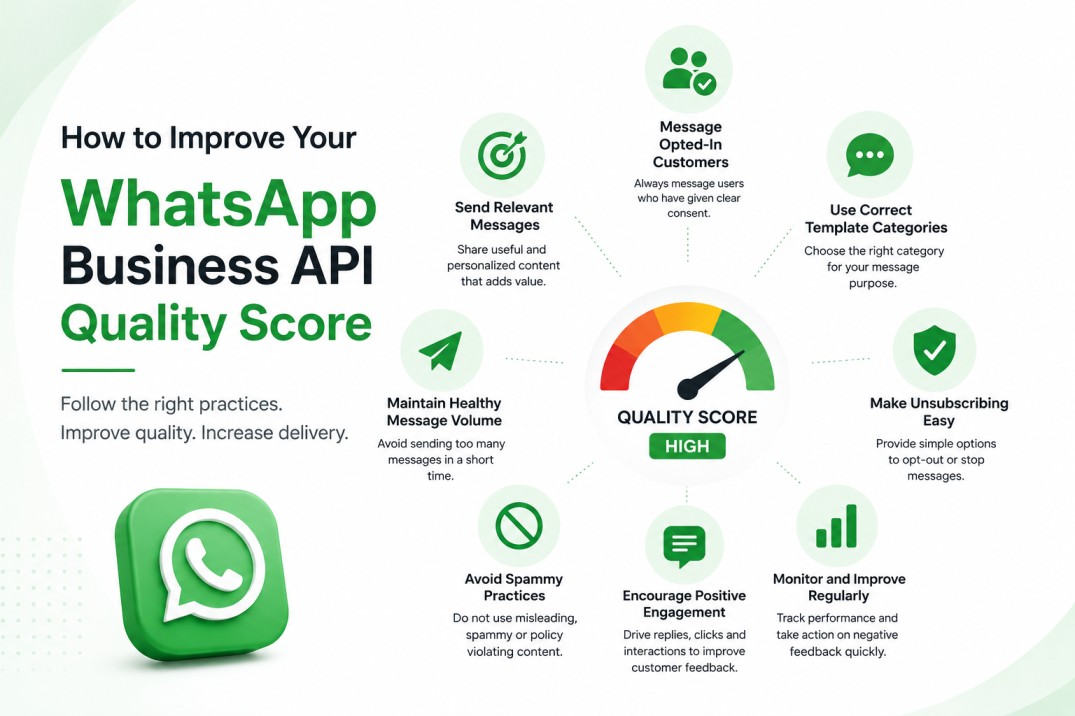
A good WhatsApp Business API quality score helps your messages reach more customers, protects your business number and supports long-term campaign growth.
Meta officially calls it a quality rating, although many businesses search for it as a WhatsApp quality score. It shows how customers are responding to messages sent from your WhatsApp Business number.
Your quality rating may fall when customers:
- Block your business number.
- Report your messages as spam.
- Say they did not sign up for your messages.
- Ignore messages because they are not relevant.
- Receive too many messages from your business.
- Receive promotional messages without clear consent.
The fastest way to improve your WhatsApp quality rating is to message only opted-in customers, send relevant content, use the correct template category, control message frequency and make unsubscribing easy.
What Is a WhatsApp Business API Quality Score?
The WhatsApp Business API quality score is a rating that shows how customers respond to messages from your business.
Meta measures phone-number quality using recent customer feedback, including blocks, reports and the reasons customers give when blocking a business. The rating is based on messages received during the previous seven days, with recent feedback carrying more importance. Meta explains phone-number quality ratings here.
Your WhatsApp Business number can have one of three quality ratings:
| Rating | Colour | Meaning |
| High | Green | Customers are receiving relevant messages with little negative feedback |
| Medium | Yellow | Some customers may be blocking, reporting or negatively responding |
| Low | Red | Immediate action is needed to prevent further restrictions |
A newly approved message template may show Quality Pending until Meta receives enough customer feedback.
Phone Number Quality and Template Quality Are Different
Businesses should monitor two separate ratings:
Phone number quality rating
This shows the overall quality of messages sent from a particular WhatsApp number. You can find it under the Phone Numbers section of WhatsApp Manager.
Message template quality rating
This shows how customers respond to a specific template. Template ratings can be:
- Quality Pending
- High
- Medium
- Low
- Paused
- Disabled
Templates with poor read rates or repeated negative feedback can be paused or disabled. Meta displays these ratings in the Manage Templates section of WhatsApp Manager. Read Meta’s template quality documentation.
This difference is important. One poorly performing template can damage campaign results even when your overall phone-number rating is still green.
Why Is Your WhatsApp Quality Rating Important?
A high WhatsApp quality rating can help your business:
- Maintain reliable message delivery.
- Protect templates from being paused.
- Increase proactive messaging capacity.
- Run larger WhatsApp marketing campaigns.
- Reduce the risk of account restrictions.
- Build better customer engagement.
- Improve campaign conversions.
Meta now manages proactive messaging limits mainly at the business portfolio level, not separately for every number. However, it still monitors individual phone numbers and message templates for quality. Poor quality can prevent your portfolio from scaling and may lead to restrictions if negative feedback continues. Review Meta’s current messaging-limit guidance.
How Does Meta Calculate WhatsApp Quality Rating?
Meta does not publish the exact formula or a fixed acceptable block percentage.
However, Meta clearly considers customer feedback such as:
- Number of people blocking your business.
- Spam reports.
- Reasons selected while blocking.
- “Didn’t sign up” feedback.
- “No longer needed” feedback.
- Offensive or misleading message reports.
- Template read and engagement performance.
Delivery rate, read rate, reply rate and click rate are useful early warning signals. However, a high read rate alone does not guarantee a high quality rating. Blocks and reports are especially important negative signals.
Because Meta does not publish an exact safe percentage, avoid relying on unofficial claims such as “a 2% block rate is always safe.”
12 Ways to Improve Your WhatsApp Business API Quality Score
1. Send Messages Only to Customers Who Have Opted In
Never send WhatsApp campaigns to purchased, scraped or unknown contact lists.
According to the WhatsApp Business Messaging Policy, you should contact a person only when:
- The person has provided their mobile number.
- The person has agreed to receive messages or calls from your business on WhatsApp.
Your opt-in form should clearly mention:
- Your business name.
- That messages will be sent on WhatsApp.
- What type of messages customers will receive.
- How frequently they may receive messages.
- How they can unsubscribe.
Meta also recommends collecting separate consent for different message types, such as order updates and promotional offers.
Example of a clear WhatsApp opt-in
I agree to receive order updates from ABC Store on WhatsApp.
A separate marketing option can say:
I agree to receive offers, product recommendations and promotional updates from ABC Store on WhatsApp. I can unsubscribe at any time.
Store the opt-in source, date, time and selected message categories in your CRM.
2. Use the Correct Message Template Category
WhatsApp templates are divided into three main categories.
| Category | When to use it | Examples |
| Utility | Updates connected to a transaction, account, order or existing service | Order confirmation, delivery update, payment reminder |
| Marketing | Promotions, recommendations, lead nurturing and re-engagement | Discounts, new products, abandoned-cart offers |
| Authentication | Identity verification through one-time passwords | Login OTP, account recovery code |
Official WhatsApp guidance describes utility messages as transaction and account-related updates, marketing messages as messages designed to build interest or drive sales, and authentication messages as verification messages containing one-time passcodes.
Do not add promotional content to a utility template.
For example:
Your order has been shipped. Buy another product today and get 20% off.
This message contains an offer, so it should not be treated as a pure utility message.
A correct utility message would be:
Your order {{1}} has been shipped. Track your delivery here: {{2}}.
3. Segment Your Audience Before Sending
Do not send the same campaign to your entire database.
Create customer segments based on:
- Opt-in category.
- Customer location.
- Preferred language.
- Last purchase date.
- Product interest.
- Website activity.
- Previous campaign engagement.
- Lead stage.
- Active or inactive customer status.
- Number of recent WhatsApp messages received.
A customer who purchased shoes should receive information related to shoes, not an unrelated insurance offer.
Better targeting reduces blocks and improves replies, clicks and conversions.
4. Personalize the Message With Real Context
Adding only the customer’s name is not enough.
Good personalization explains why the person is receiving the message.
Generic message
Hi Rahul, we have a special offer. Buy now!
Relevant message
Hi Rahul, the running shoes you viewed are back in stock in size 9. Would you like to check the available colours?
The second message feels useful because it is connected to the customer’s previous interest.
Useful personalization can include:
- Customer name.
- Product viewed.
- Order number.
- Appointment date.
- Location.
- Subscription type.
- Preferred language.
- Previous purchase.
- Relevant renewal date.
Never include sensitive customer information unnecessarily.
5. Avoid Excessive Messaging
Even customers who opted in may block your number if you send too many messages.
Create frequency rules such as:
- Do not send the same offer more than once.
- Avoid multiple marketing campaigns on the same day.
- Stop promotional messages after a customer converts.
- Reduce frequency for customers who have stopped engaging.
- Give customers control over the type of messages they receive.
- Coordinate campaigns across departments and phone numbers.
There is no universal “safe” number of messages per week. The correct frequency depends on customer expectations, message type and previous engagement.
6. Provide a Simple Opt-Out Option
A customer should not have to block your number to stop marketing messages.
Add an option such as:
- Reply STOP to unsubscribe.
- Reply PAUSE to stop messages temporarily.
- Manage WhatsApp preferences.
- Unsubscribe from offers.
- Keep order updates only.
Meta recommends adding a marketing opt-out button because an easier unsubscribe process can reduce block rates and campaign suspensions. See Meta’s opt-out button guidance.
When a customer opts out:
- Confirm the request.
- Update your CRM immediately.
- Stop the selected message category.
- Apply the preference across all WhatsApp numbers used by your business.
7. Clean Your Contact List Regularly
Remove or suppress:
- Customers who opted out.
- Invalid phone numbers.
- Repeated delivery failures.
- Duplicate contacts.
- Numbers belonging to the wrong customer.
- Long-term inactive contacts.
- Customers who no longer want a particular message category.
- Contacts without verifiable WhatsApp consent.
Do not use unofficial WhatsApp number-checking tools. Use your delivery reports, opt-in records and customer engagement data to maintain your database.
An invalid number mainly creates a delivery failure and unnecessary cost. The bigger quality risk comes from messaging valid numbers belonging to people who did not expect your message.
8. Keep Templates Short, Clear and Honest
Customers should understand the purpose of a message within the first few seconds.
Avoid:
- Long paragraphs.
- Too many capital letters.
- Misleading offers.
- Fake urgency.
- Excessive emojis.
- Unclear links.
- Multiple unrelated offers.
- Messages without your business identity.
- Claims such as “Guaranteed winner.”
- Repeated “Last chance” messages.
A good template should include:
- Your business identity.
- Why the customer is receiving the message.
- One useful piece of information.
- One clear next step.
- An opt-out option for marketing messages.
9. Use One Clear Call to Action
Do not ask customers to visit a website, download an application, call an agent, view a catalogue and complete a form in the same message.
Use one primary CTA, such as:
- Track Order
- View Details
- Confirm Appointment
- Complete Payment
- Browse Products
- Book a Demo
- Talk to Support
A clear CTA makes the message easier to understand and improves measurable engagement.
10. Test New Templates With a Small, Relevant Audience
Do not send a newly approved template to your entire database immediately.
Start with customers who:
- Opted in recently.
- Have engaged with your business.
- Are expecting the information.
- Have recently purchased or enquired.
- Match the exact campaign purpose.
Check delivery, reads, clicks, replies, unsubscribes and blocks before increasing the volume.
Important 2026 clarification
Since messaging limits are now managed at the business-portfolio level, a new number may inherit the portfolio’s available capacity. This does not mean you should immediately use the full capacity.
Gradual sending is a quality-control practice—not a shortcut for changing your Meta limit. Meta does not publish an official daily “warm-up schedule.”
11. Monitor Campaign and Template Performance
Monitor every campaign by template, audience, opt-in source and customer segment.
Important metrics include:
| Metric | What it tells you |
| Delivery rate | Whether messages are reaching valid WhatsApp numbers |
| Read rate | Whether the message and timing attract attention |
| Reply rate | Whether customers find the message relevant |
| Click rate | Whether the CTA is clear and useful |
| Opt-out rate | Whether the audience or frequency needs improvement |
| Block and report reasons | Why customers are rejecting your messages |
| Template quality | Whether a particular template is becoming risky |
| Phone-number quality | Overall customer response to messages from the number |
If quality falls after launching a new template, stop that template first and investigate.
12. Create a Helpful Customer Experience
Customers are less likely to block a business when they can get help easily.
Make sure your WhatsApp experience includes:
- Fast responses.
- Clear chatbot options.
- Human-agent transfer.
- Updated business information.
- Accurate support hours.
- Easy complaint handling.
- Relevant automated replies.
- Support in the customer’s preferred language.
WhatsApp allows free-form replies within 24 hours of the customer’s last message. Outside that customer-service window, businesses must use an approved template. The WhatsApp policy also requires automated experiences to provide a clear escalation path, such as transfer to a human, phone support or email support. Review the official policy.
What Should You Do If Your WhatsApp Quality Score Drops?
If your rating changes from Green to Yellow or Red, take immediate action.
Step 1: Stop non-essential marketing campaigns
Pause bulk marketing while you investigate. Do not continue sending a template that may be causing blocks.
Step 2: Review the previous seven days
Check:
- Templates recently launched.
- Campaign volume.
- Audience source.
- Opt-in records.
- Block reasons.
- Read and reply rates.
- Unsubscribe requests.
- Delivery failures.
- Sudden changes in frequency.
Step 3: Identify the problem template or segment
Compare campaigns by:
- Template.
- Customer segment.
- Opt-in source.
- Language.
- Campaign date.
- Product category.
- Message frequency.
The problem may be one message sent to the wrong audience rather than your complete WhatsApp strategy.
Step 4: Suppress unengaged customers
Stop marketing to contacts who repeatedly receive messages but never read, click or reply. Keep sending only the categories for which the customer has provided valid consent.
Step 5: Improve or replace the template
Create a new version with:
- Clear context.
- Shorter content.
- Better targeting.
- A single CTA.
- Honest language.
- A visible opt-out option.
Step 6: Restart with a small segment
Test the improved message with recent, engaged and clearly opted-in customers before scaling again.
Do not move the same campaign to another number to avoid the problem. Customers may still block or report the new number, and the activity can affect your wider business portfolio.
How Long Does It Take to Improve a Low WhatsApp Quality Rating?
Meta does not guarantee a fixed recovery time.
Phone-number quality is based on a rolling seven-day period, so improvement may appear as old negative feedback becomes less recent and new campaigns generate better customer responses.
Recovery depends on:
- The amount of negative feedback.
- Whether the problematic campaign has stopped.
- The quality of new messages.
- Audience relevance.
- Opt-in quality.
- Block and report activity.
Avoid anyone promising to change your Meta quality rating manually. A WhatsApp API provider can help you improve targeting, templates and monitoring, but only Meta controls the final rating.
Daily WhatsApp Quality Checklist
Before sending any campaign, ask:
- Did every recipient provide a valid WhatsApp opt-in?
- Does the opt-in cover this message category?
- Is the selected template category correct?
- Is the message relevant to this audience?
- Has the customer received another campaign recently?
- Does the message clearly identify the business?
- Is there one clear CTA?
- Can marketing recipients unsubscribe easily?
- Have opted-out and inactive users been removed?
- Has the new template been tested on a smaller audience?
- Are delivery, read, reply and block reports being monitored?
Frequently Asked Questions
What is a good WhatsApp Business API quality score?
A Green or High rating is the best WhatsApp quality rating. It means your recent messages have received limited negative customer feedback.
Where can I check my WhatsApp quality rating?
Open Meta Business Suite, go to WhatsApp Manager and select Phone Numbers. The Quality Rating column shows Green, Yellow or Red. Template quality is available under Message Templates.
Why did my WhatsApp quality rating suddenly drop?
Common causes include a new template, an unsegmented broadcast, excessive frequency, an old contact list, unclear opt-in or a message that customers did not expect.
How often does the WhatsApp quality rating change?
Meta continuously evaluates recent messaging activity. Phone-number quality considers customer feedback from the previous seven days, with recent feedback carrying more importance.
Does a template approval mean the message is safe?
No. Approval means the template passed Meta’s initial review. Its quality can still fall after customers receive it, ignore it, block the number or report the message.
Can a Low quality rating block my WhatsApp number?
A Low rating does not always mean immediate suspension. However, sustained negative feedback can affect scaling, pause templates or lead to restrictions and policy enforcement.
Can a WhatsApp API provider increase my rating manually?
No. Meta controls the rating. A provider can help with opt-in management, template selection, segmentation, analytics and campaign controls.
Do read rates affect WhatsApp quality?
Read rates are especially useful for evaluating individual template performance. Low read rates can indicate poor timing, targeting or relevance. However, blocks, reports and other negative feedback are major disclosed signals for phone-number quality.
What is the safe WhatsApp block rate?
Meta does not publish a universal safe block-rate percentage. Monitor changes in your own campaigns and stop a campaign when blocks or negative feedback suddenly increase.
Can I use a purchased database for WhatsApp marketing?
No. A purchased phone-number list does not provide valid WhatsApp consent. Sending to such lists can generate blocks, reports and policy action.
Is customer consent on my website valid?
It can be valid when it clearly states that the person agrees to receive specific messages from your business on WhatsApp and the process also follows applicable local laws. Keep evidence of the consent.
Is double opt-in compulsory?
Meta’s general policy requires clear opt-in but does not universally require double opt-in. Double opt-in can still provide stronger consent records and improve list quality.
Does a Click-to-WhatsApp ad provide marketing consent?
A Click-to-WhatsApp ad starts a customer-initiated conversation. It should not automatically be treated as unlimited permission for unrelated future marketing. Capture clear marketing consent before adding that person to promotional campaigns.
Can I send messages after the 24-hour service window?
Yes, but you must use an approved message template outside the 24-hour customer-service window.
Are opt-out buttons compulsory?
Meta requires businesses to honour opt-out requests and recommends clear opt-out flows. Adding an opt-out button or a simple STOP instruction to marketing templates can reduce blocks.
Do invalid phone numbers reduce quality?
Invalid numbers create delivery failures and unnecessary cost. They are not the same as spam reports, but a poorly maintained database often also contains contacts with outdated or unclear consent.
Should I warm up a new WhatsApp API number?
Gradual sending is recommended when testing a new number, template or audience. Start with engaged, opted-in users and increase volume after reviewing results. Meta does not publish an official warm-up schedule.
What should I do if a template is paused?
Stop using the template, review its audience and content, inspect opt-in quality, and create a clearer and more relevant version. Do not immediately send the same content through another template or number.
Build Better WhatsApp Campaigns With Authkey
Maintaining a high WhatsApp Business API quality score requires more than sending fewer messages. You need proper consent, audience segmentation, compliant templates, campaign analytics and regular monitoring.
With Authkey, businesses can manage official WhatsApp API onboarding, templates, marketing campaigns, automation and delivery and read reports from one platform.
Start Free with Authkey or Book a WhatsApp API Demo to build compliant and better-performing WhatsApp campaigns.